Managing grocery shopping for a household can quickly become confusing when different people remember different items, preferences change during the week, and messages like “don’t forget milk” get lost in chats or forgotten entirely, which is why many families feel that shopping turns into a constant source of small frustrations.
For the person responsible for organizing purchases, involving other people in the house sounds like a great idea in theory, yet in practice it often fails because notes are scattered, lists are outdated, or nobody knows which items have already been bought.
That is exactly where family shared grocery list apps become useful, because they allow everyone to add items, see updates in real time, and participate in the process without complicated steps or technical barriers.
This article was created to show how shared shopping list apps can simplify family coordination, reduce forgotten items, avoid buying duplicates, and make grocery shopping feel lighter and more collaborative.
Throughout this guide, you will find reviews of popular and safe apps with shared list features, explanations of how sync between phones works, pros and limitations of each option, and realistic examples of how families actually use these tools in everyday life.
The tone here is familiar, practical, and relaxed, because organizing groceries should not feel like a project management task.
Why Family Shared Grocery List Apps Make Such a Difference
Understanding why family shared grocery list apps are so helpful begins with recognizing that grocery shopping is rarely a solo activity in families, even if only one person physically goes to the store.
Different people notice missing items at different times, children remember snacks, partners think about meals, and everyone has opinions, which means information needs to be collected from multiple sources.
When lists are written on paper or kept only on one phone, communication breaks down easily, while shared shopping lists allow information to flow naturally.
Common Problems These Apps Help Solve
- Forgetting items that someone mentioned earlier.
- Buying duplicates because lists were not updated.
- Sending many messages about groceries.
- Not knowing what was already purchased.
- Feeling alone in managing household shopping.
With the right app, grocery shopping becomes a shared responsibility instead of a one person burden.
What Makes a Grocery List App Good for Families
Not every shopping list app works well for families, because shared use requires clarity, reliability, and simplicity, especially when people of different ages and technology comfort levels are involved.
A family friendly app should feel intuitive enough that everyone can use it without instructions.
Essential Features for Family Use
- Shared shopping list accessible to multiple people.
- Real time sync between phones.
- Clear item marking when something is bought.
- Simple interface without clutter.
- Easy invitation for family members.
Extra features are welcome, but only if they do not make the app harder to use.
How Shared Shopping Lists and Sync Between Phones Work
For beginners, it helps to understand how shared shopping lists actually work, because the technology behind them is designed to feel invisible.
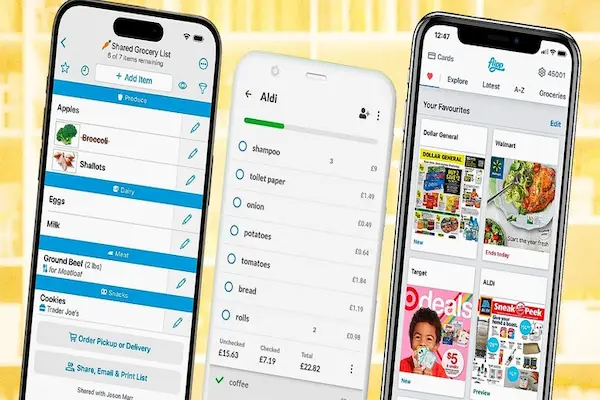
When a list is shared, all invited family members see the same list, and any change made by one person appears almost instantly on the others’ phones.
What Happens in Real Time
- An item added by one person appears for everyone.
- An item checked off disappears or shows as completed.
- Notes or quantities update automatically.
- No need to refresh manually.
This real time behavior is what prevents confusion at the store.
Overview of Popular Family Shared Grocery List Apps
In this app review, we will look at five popular and safe family shared grocery list apps that are commonly used by households, focusing on daily practicality rather than advanced features.
Apps Covered in This Review
- Bring
- AnyList
- OurGroceries
- Google Keep
- Microsoft To Do
Each app will be explained with features, advantages, limitations, and family use examples.
Bring: Designed Specifically for Shared Grocery Lists
Bring is an app created with grocery shopping in mind, focusing strongly on shared lists and visual clarity, which makes it very popular among families.
Main Features of Bring
- Shared shopping lists.
- Real time updates.
- Visual product icons.
- Categories for groceries.
- Simple reminders.
Advantages for Families
- Very intuitive interface.
- Easy for all ages.
- Clear visual feedback when items are bought.
Limitations to Consider
- Focused mostly on groceries.
- Less flexible for non shopping tasks.
Family Use Example
One person creates a weekly grocery list, children add snacks they want, another adult adds dinner ingredients, and the person at the store sees items disappear as they are checked off.
AnyList: Organized Lists With Shared Control
AnyList is a popular option for families who want shared grocery lists plus a bit more organization.
Main Features of AnyList
- Shared shopping lists.
- Real time sync.
- Item categories.
- Notes and quantities.
Advantages for Families
- Clear separation of items.
- Easy collaboration.
- Simple interface.
Limitations to Consider
- Some advanced features are paid.
- Interface less visual than Bring.
Family Use Example
A family uses AnyList to keep one shared grocery list and separate lists for pharmacy and household supplies.
OurGroceries: Straightforward and Reliable for Sharing
OurGroceries focuses on doing one thing well, which is keeping shared grocery lists synced between phones.
Main Features of OurGroceries
- Shared lists.
- Real time updates.
- Multiple lists.
- Simple layout.
Advantages for Families
- Very easy to use.
- Reliable syncing.
- Good for non technical users.
Limitations to Consider
- Basic design.
- Limited customization.
Family Use Example
Parents share the main grocery list, while older children add items when they notice something missing.
Google Keep: Simple Shared Notes for Shopping
Google Keep is not designed only for groceries, yet its shared notes feature makes it a useful option for families who already use it.
Main Features of Google Keep for Shopping
- Shared notes.
- Checklists.
- Real time updates.
- Simple interface.
Advantages for Families
- Very easy to share.
- Works across devices.
- Free options.
Limitations to Consider
- No grocery specific features.
- Limited item organization.
Family Use Example
A shared checklist called “Groceries” is used by everyone in the household to add items as they run out.
Microsoft To Do: Shared Lists Beyond Groceries
Microsoft To Do can be used as a shared shopping list app, especially for families who want grocery lists plus other shared tasks.
Main Features of Microsoft To Do
- Shared lists.
- Checklists.
- Reminders.
- Categories.
Advantages for Families
- Simple and clean.
- Good for shared responsibilities.
Limitations to Consider
- Not grocery focused.
- No visual product icons.
Family Use Example
A shared “Shopping” list is combined with household task lists like cleaning or errands.
Comparison of Family Shared Grocery List Apps
Looking at differences side by side helps clarify which app fits each household.
Quick Comparison Highlights
- Best grocery focus: Bring.
- Balanced organization: AnyList.
- Maximum simplicity: OurGroceries.
- Multi purpose notes: Google Keep.
- Tasks plus shopping: Microsoft To Do.
Real Time Marking: Why It Matters at the Store
One of the most valuable features of family shared grocery list apps is real time item marking, because it avoids confusion when more than one person is shopping.
Benefits of Real Time Marking
- No duplicate purchases.
- Clear progress at the store.
- Instant feedback for family members.
Using Shared Shopping Lists as a Family Routine
For shared lists to work well, they should be part of a simple routine.
Suggested Weekly Family Routine
- One person creates or clears the weekly list.
- Everyone adds items during the week.
- The shopper checks items off at the store.
- List is reviewed after shopping.
Daily Habits That Help
- Add items immediately when noticed.
- Avoid sending grocery messages.
- Trust the shared list.
Common Challenges and How Families Handle Them
Even good apps require small adjustments.
Typical Challenges
- Forgetting to add items.
- Too many similar lists.
- Overcomplicating categories.
Simple Solutions
- Keep one main list.
- Review before shopping.
- Use categories lightly.
Tips for Involving Everyone in the Household
Family coordination improves when everyone participates.
Encouraging Participation
- Show how easy it is to add items.
- Use the app consistently.
- Avoid criticism for mistakes.
Frequently Asked Questions About Family Shared Grocery List Apps
Do all family members need the same phone type?
Most apps work across different phones.
Is internet required?
Sync works best with internet access.
Are these apps safe?
Reputable apps use standard security practices.
Making Grocery Shopping a Shared Effort
Choosing the right family shared grocery list apps can transform shopping from a stressful responsibility into a smooth and collaborative process, especially when everyone in the household can contribute in real time.
By understanding shared shopping list features, real time sync between phones, and the advantages and limitations of each app, families can find a solution that fits their habits instead of forcing change.
Once grocery lists become shared, clear, and reliable, everyday shopping feels lighter, more organized, and far less frustrating for everyone involved.