Wanting to understand where money goes each month is a very common feeling, especially when the end of the month arrives faster than expected and it feels difficult to explain why the balance is lower than planned, even without any big or unusual purchases.
For many people, the idea of organizing finances brings immediate resistance, not because money is unimportant, but because spreadsheets, formulas, and complex financial language create the impression that budgeting is only for experts or people who love numbers.
That is exactly why budget tracking apps for beginners have become popular, as they offer a simpler and more visual way to follow expenses, helping users see patterns, habits, and small daily choices that quietly shape monthly results.
This article was created for anyone who wants clarity instead of complexity, who prefers gentle awareness over strict control, and who is looking for simple budget apps that make sense in real life rather than promising unrealistic financial transformations.
Throughout this guide, you will find a comparison of beginner-friendly expense tracker apps, explanations of essential features like categories and monthly overview charts, practical ideas for daily use, and an important reminder that while apps are helpful tools, they should not be the only source for major financial decisions.
The tone here is careful, realistic, and grounded, because beginner finance works best when it builds understanding step by step.
Why Budget Tracking Apps for Beginners Are Helpful
Understanding why budget tracking apps for beginners are useful starts with recognizing that most financial stress does not come from lack of effort, but from lack of visibility, since it is hard to manage what you cannot clearly see.
When expenses happen automatically through cards, subscriptions, and small daily purchases, money becomes abstract, which makes it difficult to notice patterns until a problem appears.
Simple budget apps help bring spending back into focus, turning numbers into visual information that is easier to understand and reflect on.
Common Situations Where Expense Tracking Helps
- Feeling surprised by low balances at the end of the month.
- Not knowing how much is spent on small daily items.
- Wanting to save but not knowing where to start.
- Trying to reduce spending without clear data.
- Feeling anxious about money decisions.
For beginners, awareness is more important than strict rules.
What Budget Tracking Apps Actually Do
Before choosing an app, it helps to understand what budget tracking apps actually do in simple terms, because many beginners imagine something far more complex than the reality.
A basic expense tracker records money that comes in and goes out, usually grouping expenses into categories such as food, transport, or bills, and then shows this information in lists or charts.
Over time, these records create a monthly overview that helps users understand habits rather than judge them.
Core Functions of Simple Budget Apps
- Register daily expenses.
- Group spending into categories.
- Show totals by period.
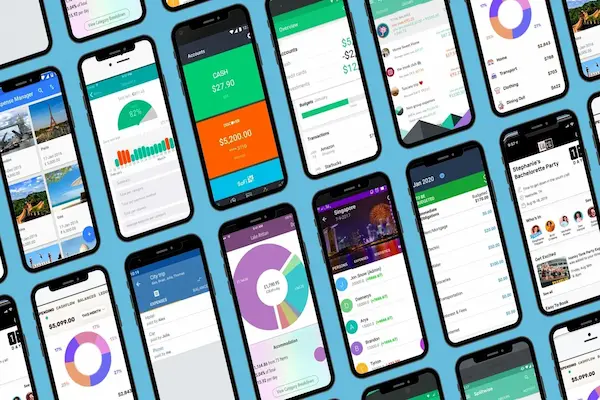
- Display simple charts or summaries.
Nothing more is required for an app to be useful at the beginner level.
Beginner Finance: Focus on Awareness, Not Perfection
One common mistake beginners make when approaching finance is expecting immediate control or dramatic change, which often leads to frustration and abandonment.
Beginner finance works best when the goal is understanding rather than restriction, because once patterns are visible, adjustments feel more natural.
Budget tracking apps for beginners are tools for learning, not for punishment.
Healthy Expectations When Starting
- Tracking is more important than optimizing.
- Missing entries happens.
- Small insights matter.
- Consistency grows gradually.
Progress starts with observation.
What Makes a Budget App Beginner Friendly
Not all finance apps are suitable for beginners, because some focus on advanced planning, investments, or strict budgeting methods that feel overwhelming.
A beginner-friendly app prioritizes clarity, ease of use, and minimal setup.
Key Characteristics of Beginner-Friendly Budget Apps
- Simple interface.
- Quick expense entry.
- Clear categories.
- Visual monthly overview.
- No complex terminology.
If an app feels confusing in the first days, it is usually not the right fit.
Overview of Popular Budget Tracking Apps for Beginners
In this app review, we will look at several popular and safe budget tracking apps that are commonly used by beginners, focusing on everyday usability rather than advanced financial tools.
Apps Covered in This Guide
- :contentReference[oaicite:0]{index=0}
- :contentReference[oaicite:1]{index=1}
- :contentReference[oaicite:2]{index=2}
- :contentReference[oaicite:3]{index=3}
- :contentReference[oaicite:4]{index=4}
Each app will be discussed with features, strengths, limitations, and practical usage ideas.
Mint: Automatic Overview for Beginners
Mint is known for offering automatic expense tracking through bank connections, which can be helpful for beginners who want minimal manual input.
Main Features of Mint
- Automatic transaction import.
- Expense categories.
- Monthly summaries.
- Basic alerts.
Why It Appeals to Beginners
- Less manual work.
- Clear overview of spending.
- Simple charts.
Limitations to Consider
- Requires bank connections.
- Less control over categorization.
Practical Use Example
A beginner checks Mint once a week to see how much was spent on food and transport without entering every purchase manually.
Wallet: Manual Control With Visual Clarity
Wallet focuses on manual tracking, which helps beginners become more aware of each expense.
Main Features of Wallet
- Manual expense entry.
- Custom categories.
- Charts and summaries.
Why It Appeals to Beginners
- Strong visual overview.
- Clear spending categories.
- Good learning tool.
Limitations to Consider
- Requires consistent input.
Practical Use Example
A user enters expenses daily to understand habits and notice where money goes.
Spendee: Visual Spending Awareness
Spendee emphasizes design and visual understanding, making it approachable for users who prefer charts.
Main Features of Spendee
- Expense tracking.
- Colorful charts.
- Category breakdowns.
Why It Appeals to Beginners
- Easy to read graphs.
- Intuitive design.
Limitations to Consider
- Some features require payment.
Practical Use Example
A beginner reviews weekly charts to see which categories are growing.
Money Manager: Straightforward Tracking
Money Manager focuses on simplicity and speed.
Main Features of Money Manager
- Quick expense entry.
- Basic categories.
- Simple monthly view.
Why It Appeals to Beginners
- No learning curve.
- Fast daily use.
Limitations to Consider
- Limited analysis tools.
YNAB: Structured Approach With Caution
YNAB is often mentioned in budgeting discussions, though beginners should approach it carefully.
Main Features of YNAB
- Budget categories.
- Planning approach.
- Education content.
Why Some Beginners Like It
- Strong structure.
- Clear budgeting philosophy.
Limitations to Consider
- Steeper learning curve.
- Subscription required.
Categories and Charts: Why They Matter
Categories and charts turn raw numbers into understandable stories.
Common Expense Categories
- Food.
- Transport.
- Bills.
- Entertainment.
Benefits of Visual Monthly Overview
- Quick understanding.
- Pattern recognition.
- Less emotional reaction.
Practical Daily Use Ideas for Beginners
Apps work best with light routines.
Simple Daily Routine
- Open the app once a day.
- Add expenses.
- Do not analyze immediately.
Weekly Check-In
- Review categories.
- Notice patterns.
- Avoid judgment.
Common Mistakes Beginners Make
- Trying to track everything perfectly.
- Using too many apps.
- Making big decisions too fast.
Important Reminder About Financial Decisions
Budget tracking apps are educational tools.
They should not be the only basis for major financial decisions.
When to Seek Additional Guidance
- Debt planning.
- Investments.
- Long-term financial goals.
Frequently Asked Questions About Budget Tracking Apps for Beginners
Do I need to track every expense?
No, consistency matters more than completeness.
Are free apps enough?
For beginners, free versions are usually sufficient.
Will tracking make me save more?
Tracking improves awareness, which can support better choices.
Building Financial Awareness Step by Step
Using budget tracking apps for beginners is about understanding daily spending, not about achieving perfection or promising fast financial improvement.
By choosing simple budget apps, using categories and monthly overviews wisely, and approaching beginner finance with curiosity instead of pressure, it becomes easier to see where money goes and why.
With patience and realistic expectations, expense tracking turns into a helpful habit that supports informed decisions while respecting the complexity of real life finances.