Relying on public transport every day can be both practical and exhausting, especially for people who depend on buses or metro lines to get to work, school, medical appointments, or leisure activities, because small uncertainties about routes, schedules, or delays often turn simple trips into stressful experiences.
Many users of public transport feel insecure not because they lack ability, but because information is scattered, outdated, or difficult to understand, which makes it harder to know when the next bus will arrive, where to change lines, or how long the journey will actually take.
This public transport tracker apps guide was created to help people move around cities with more autonomy and confidence, using technology as a supportive tool rather than a source of confusion or dependence.
Throughout this article, you will find a clear and practical review of popular bus and metro apps, explanations of features like live arrival times and route planners, tips for downloading offline maps, and basic safety considerations that are useful for daily commuting.
The tone of this guide is accessible, practical, and focused on independence, because public transport works best when users feel informed and prepared rather than anxious or rushed.
Why Public Transport Tracker Apps Make Daily Life Easier
Understanding why public transport tracker apps are so helpful starts with recognizing that urban mobility is complex, especially in cities with multiple bus lines, metro branches, and frequent schedule changes.
When people rely only on printed timetables or memory, mistakes become more likely, leading to missed connections, longer waiting times, and unnecessary frustration.
Public transport apps centralize information, offering updated schedules, route suggestions, and live arrival times that adapt to real conditions.
Common Challenges Faced by Public Transport Users
- Missing buses due to unclear schedules.
- Getting lost when changing lines.
- Not knowing where to get off.
- Waiting too long at stops.
- Feeling insecure in unfamiliar routes.
Access to clear information reduces uncertainty.
What Public Transport Tracker Apps Actually Do
Before comparing specific apps, it helps to understand what public transport tracker apps actually offer, because many people assume they are only digital maps, when in reality they provide a combination of navigation, timing, and planning tools.
A typical public transport app shows routes for buses, metro, trains, or trams, estimates travel time, displays live arrival information when available, and suggests alternative routes when disruptions occur.
Some apps also include walking directions between stops and alerts for service changes.
Core Functions of Transport Tracker Apps
- Route planning from point A to point B.
- Live arrival times for buses and trains.
- Stop and station information.
- Estimated travel duration.
- Map-based navigation.
These tools work together to support confident navigation.
Live Arrival Times: Reducing Waiting and Stress
Live arrival times are one of the most valued features in public transport tracker apps, because they help users understand how long they actually need to wait, rather than relying on static timetables.
Seeing a bus approaching in real time or knowing that a metro train will arrive in a few minutes allows people to plan better, avoid unnecessary rushing, and feel more in control of their journey.
Benefits of Live Arrival Information
- Less uncertainty at stops.
- Better time management.
- Reduced anxiety.
- Improved confidence in routes.
Accuracy matters more than visual complexity.
Route Planner: Finding the Best Way Through the City
A route planner is essential for anyone who uses public transport regularly, especially in unfamiliar areas or when multiple routes are possible.
Good route planners consider distance, number of transfers, travel time, and sometimes walking effort, offering options that suit different preferences.
What Makes a Route Planner Useful
- Clear step-by-step instructions.
- Easy-to-read maps.
- Alternative route suggestions.
- Transfer details.
Simplicity helps users follow directions with confidence.
City Navigation for Everyday Use
City navigation through public transport apps goes beyond finding routes, because it also involves understanding the environment, such as where stops are located, how stations connect, and how walking fits into the journey.
Apps that combine maps with transport data help users visualize the entire trip.
Helpful Navigation Features
- Nearby stops view.
- Station maps.
- Walking directions.
- Clear stop names.
Visual clarity improves orientation.
Overview of Popular Public Transport Tracker Apps
In this public transport tracker apps guide, we will review widely used and safe apps that support bus and metro navigation, focusing on ease of use, reliability, and everyday practicality.
Apps Covered in This Guide
- :contentReference[oaicite:1]{index=1}
- :contentReference[oaicite:2]{index=2}
- :contentReference[oaicite:3]{index=3}
- :contentReference[oaicite:4]{index=4}
- :contentReference[oaicite:5]{index=5}
Each app will be reviewed with features, strengths, limitations, and best use cases.
Google Maps: Familiar and Widely Available
Google Maps is one of the most commonly used navigation apps and includes strong public transport features in many cities.
Main Features of Google Maps for Public Transport
- Route planning with multiple options.
- Live arrival times where available.
- Integrated walking directions.
- Offline map downloads.
Strengths for Daily Users
- Very familiar interface.
- Works in many cities.
- Clear step-by-step guidance.
Limitations to Consider
- Live data quality varies by city.
Best For
Users who want one app for navigation and transport.
Moovit: Public Transport Focused
Moovit is designed specifically for public transport and offers detailed information about buses, metro lines, and stops.
Main Features of Moovit
- Live arrival times.
- Route planner.
- Service alerts.
- Stop-level details.
Strengths for Daily Users
- Strong focus on public transport.
- Clear route steps.
Limitations to Consider
- Interface may feel busy.
Best For
People who rely heavily on buses or metro.
Citymapper: Clear and User Friendly Navigation
Citymapper is known for its clean design and very clear transport instructions.
Main Features of Citymapper
- Simple route options.
- Live arrival times.
- Clear maps.
- Step-by-step navigation.
Strengths for Daily Users
- Easy to understand directions.
- Friendly interface.
Limitations to Consider
- Available in selected cities.
Best For
Users who want clarity and ease of use.
Transit: Real Time Focus With Simplicity
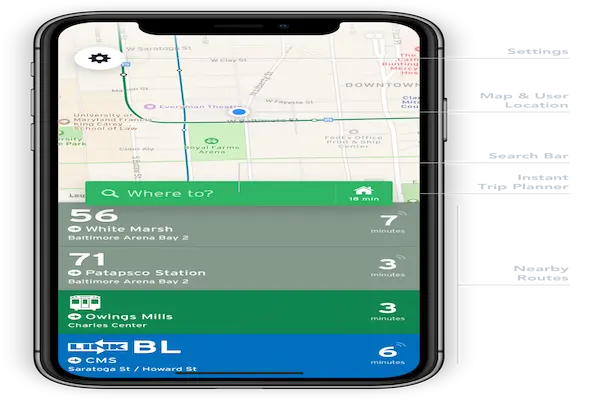
Transit emphasizes real time data and minimal design.
Main Features of Transit
- Live vehicle tracking.
- Nearby departures.
- Simple navigation.
Strengths for Daily Users
- Fast access to live info.
- Low learning curve.
Limitations to Consider
- Less detailed planning tools.
Best For
Users focused on live arrivals.
Here WeGo: Offline Friendly Navigation
Here WeGo offers navigation with strong offline map support.
Main Features of Here WeGo
- Public transport routes.
- Offline maps.
- Clear directions.
Strengths for Daily Users
- Works without internet.
- Clean layout.
Limitations to Consider
- Live data limited in some areas.
Best For
Users with limited internet access.
Comparing Key Features Across Apps
Live Arrival Times
- Strong: Moovit, Citymapper, Transit.
- Moderate: Google Maps.
- Limited: Here WeGo.
Route Planner Quality
- Very clear: Citymapper, Google Maps.
- Detailed: Moovit.
- Basic: Transit.
Offline Map Support
- Strong: Google Maps, Here WeGo.
- Limited: Moovit, Citymapper.
Downloading Offline Maps: A Useful Preparation Step
Downloading maps in advance is especially useful for users who travel through areas with poor connectivity or limited data plans.
Benefits of Offline Maps
- Navigation without internet.
- Reduced data usage.
- Increased reliability.
When Offline Maps Are Most Helpful
- Long commutes.
- Travel to unfamiliar areas.
- Limited mobile data plans.
Tips for Using Public Transport Apps More Effectively
Using these apps well involves small habits.
Practical Usage Tips
- Check routes before leaving.
- Confirm live arrival times.
- Save frequent routes.
- Review alternative options.
Basic Safety Tips for Daily Commuting
Technology helps navigation, yet personal safety remains important.
General Safety Considerations
- Avoid using phone in crowded areas excessively.
- Keep personal items secure.
- Stay aware of surroundings.
- Plan routes in advance.
Common Mistakes When Using Transport Apps
- Relying on one route only.
- Ignoring service alerts.
- Not updating apps.
How to Choose the Best Public Transport Tracker App for You
The best app depends on daily habits.
Questions to Guide Your Choice
- Do I need live arrival times?
- Is offline access important?
- Do I prefer simple or detailed information?
Frequently Asked Questions About Public Transport Apps
Are live arrival times always accurate?
Accuracy depends on city data quality.
Should I use more than one app?
One main app is usually enough.
Do these apps work in all cities?
Coverage varies by region.
Moving Through the City With More Confidence
This public transport tracker apps guide shows that using the right app can transform daily commuting into a more predictable and manageable experience.
By choosing apps that provide clear route planning, reliable live arrival times, offline map options, and easy to read navigation, users can move through the city with greater autonomy and confidence.
When information is accessible and understandable, public transport becomes less intimidating and more empowering, supporting daily routines with clarity and peace of mind.