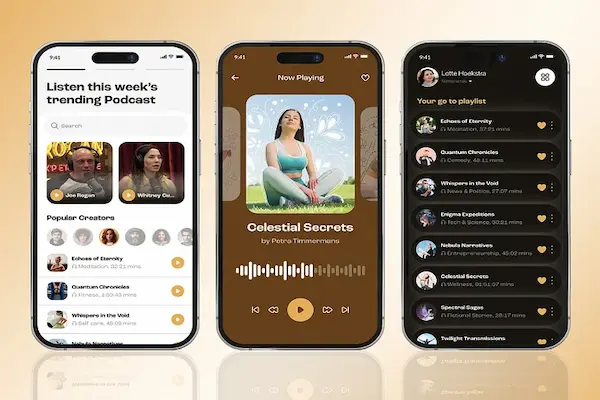
Hearing people talk about podcasts has become very common in conversations, social media, and even traditional media, yet many beginners still feel unsure about how podcasts actually work, where to listen to them, and which app makes the experience simple instead of confusing.
For someone who has never used a dedicated podcast app, the idea of subscribing to shows, downloading episodes, managing lists, and adjusting playback speed can sound more technical than it really is, especially when explanations online assume previous knowledge.
This guide about podcast listening apps for beginners was created to remove that confusion, using friendly language, clear examples, and practical explanations that help anyone start listening without feeling overwhelmed or lost.
Throughout this article, you will learn the basics of podcast apps, understand how to subscribe to shows, download episodes, and control playback speed, compare popular apps in a simple way, and receive suggestions for first steps that make creating a listening habit feel natural and enjoyable.
The tone of this content is conversational, approachable, and explanatory, because podcasts themselves are usually relaxed conversations, and learning how to listen should feel just as comfortable.
What Exactly Is a Podcast and Why So Many People Enjoy Them
Understanding podcast listening apps for beginners starts with understanding what a podcast actually is, because many newcomers imagine podcasts as something complicated or reserved for technology enthusiasts.
A podcast is essentially an audio program, usually released in episodes, that people can listen to whenever they want, covering topics such as news, storytelling, education, entertainment, interviews, or daily life experiences.
Unlike live radio, podcasts do not require listening at a specific time, which makes them ideal for moments like commuting, walking, cooking, exercising, or relaxing at home.
Common Reasons People Start Listening to Podcasts
- Learning new things in a relaxed way.
- Keeping company during routine tasks.
- Hearing different perspectives and stories.
- Entertainment without screens.
- Making better use of travel or waiting time.
Flexibility is one of the biggest attractions of podcasts.
Why Using a Dedicated Podcast App Makes Things Easier
Many beginners wonder why they need a specific app just for podcasts, especially when audio can be found in many places, yet dedicated podcast apps are designed to organize shows and episodes in a way that regular music or video apps often do not.
A podcast app keeps track of episodes you have listened to, automatically downloads new ones if you want, remembers where you stopped listening, and helps you discover new content related to your interests.
Without a dedicated app, managing podcasts quickly becomes messy and inconvenient.
Benefits of Using a Podcast App
- Automatic organization of episodes.
- Easy subscription to shows.
- Offline listening through downloads.
- Playback controls designed for spoken audio.
- Simple discovery of new podcasts.
Organization reduces frustration for beginners.
Podcast Apps Basics: Key Concepts Explained Simply
Learning podcast apps basics helps beginners feel confident from the start, because understanding a few common terms makes everything else clearer.
Subscribe Shows
Subscribing to a podcast means telling the app that you like a show and want easy access to its episodes, which is similar to following a channel or adding a favorite.
When you subscribe, new episodes usually appear automatically in your library.
Episodes
Episodes are individual audio files released by a podcast, often weekly or biweekly, each covering a specific topic or conversation.
Download Episodes
Downloading episodes allows you to listen without internet, which is very useful for travel or areas with poor connection.
Playback Speed
Playback speed controls let you listen faster or slower, which many beginners find helpful after getting comfortable with podcasts.
Lists and Queues
Lists or queues help you organize what you want to listen to next, avoiding the need to search every time.
First Steps: How Beginners Can Start Listening Without Stress
Starting with podcasts does not require advanced setup, and beginners can follow a few simple steps to begin comfortably.
Basic Steps to Get Started
- Choose one podcast app.
- Search for a topic you already like.
- Subscribe to one or two shows.
- Play a recent episode.
- Listen casually without pressure.
Keeping the process simple helps build confidence.
Understanding Downloads and Offline Listening
Downloading episodes is one of the most practical features in podcast listening apps for beginners, especially for people who commute or have limited mobile data.
When an episode is downloaded, it stays on your phone and can be played anytime, even without internet access.
Why Downloading Episodes Is Useful
- Saves mobile data.
- Works in areas without signal.
- Prevents interruptions.
Many apps allow automatic downloads of new episodes.
Playback Speed: Listening at Your Own Pace
Playback speed is often overlooked by beginners, yet it becomes a favorite feature for many listeners over time.
Most podcast apps allow speeds such as 0.8x, 1x, 1.2x, or even faster, letting users adapt listening to their comfort and attention level.
When Playback Speed Can Help
- Speeding up slow conversations.
- Saving time on long episodes.
- Slowing down complex explanations.
There is no correct speed, only personal preference.
Overview of Popular Podcast Listening Apps for Beginners
To help beginners choose, this guide compares well known and safe podcast apps, focusing on ease of use, basic features, and overall experience rather than advanced customization.
Apps Covered in This Comparison
- :contentReference[oaicite:1]{index=1}
- :contentReference[oaicite:2]{index=2}
- :contentReference[oaicite:3]{index=3}
- :contentReference[oaicite:4]{index=4}
Each app will be explained in a simple and beginner friendly way.
Spotify: Familiar Interface for New Listeners
Spotify is widely known for music, yet it also offers podcasts in the same app, which makes it a common starting point for beginners.
Main Features of Spotify for Podcasts
- Search by topic or show.
- Subscribe to podcasts.
- Download episodes.
- Adjust playback speed.
Why Beginners Like Spotify
- Familiar layout.
- No need to install another app.
- Easy playback controls.
Limitations to Consider
- Podcast organization is basic.
Apple Podcasts: Simple and Focused Experience
Apple Podcasts is dedicated entirely to podcasts, offering a clean and straightforward experience.
Main Features of Apple Podcasts
- Clear podcast library.
- Episode downloads.
- Playback speed control.
Why Beginners Appreciate It
- Focused only on podcasts.
- Simple navigation.
Limitations to Consider
- Mainly for Apple users.
Google Podcasts: Minimal and Easy to Use
Google Podcasts focuses on simplicity, offering a clean interface with essential features.
Main Features of Google Podcasts
- Simple subscriptions.
- Automatic downloads.
- Playback speed options.
Why Beginners Choose It
- Very easy learning curve.
- Clean design.
Limitations to Consider
- Fewer discovery features.
Pocket Casts: Slightly More Advanced but Still Friendly
Pocket Casts offers more control while remaining accessible to beginners willing to explore features gradually.
Main Features of Pocket Casts
- Advanced playback controls.
- Strong episode management.
- Clear queues and lists.
Why Beginners Grow Into It
- Excellent organization tools.
- Custom playback options.
Limitations to Consider
- More options may feel overwhelming at first.
Simple Comparison of Podcast Apps for Beginners
Ease of Use
- Very easy: Spotify, Google Podcasts.
- Easy: Apple Podcasts.
- Moderate: Pocket Casts.
Podcast Organization
- Basic: Spotify.
- Good: Apple Podcasts, Google Podcasts.
- Excellent: Pocket Casts.
Playback Speed Control
- Available in all apps.
Creating Your First Podcast Routine
Building a listening habit works best when podcasts fit naturally into daily life.
Easy Ways to Add Podcasts to Your Day
- Listen during commuting.
- Play episodes while cooking.
- Use podcasts during walks.
- Relax with podcasts before sleep.
Consistency matters more than duration.
Tips for Choosing Your First Podcasts
Selecting the right content makes the first experience enjoyable.
Suggestions for Beginners
- Start with topics you already enjoy.
- Choose shorter episodes.
- Avoid subscribing to too many shows at once.
Common Mistakes Beginners Make With Podcast Apps
- Subscribing to too many podcasts.
- Forgetting to download episodes.
- Stopping after one episode.
Frequently Asked Questions About Podcast Listening Apps for Beginners
Do I need internet to listen?
No, downloaded episodes work offline.
Are podcasts free?
Most podcasts are free to listen.
Can I stop and continue later?
Apps remember where you stopped.
Starting Your Podcast Journey With Confidence
Using podcast listening apps for beginners does not require technical knowledge, only curiosity and a willingness to try something new.
By understanding podcast apps basics, learning how to subscribe to shows, download episodes, and adjust playback speed, and choosing an app that feels comfortable, anyone can turn podcasts into a pleasant part of daily routine.
When listening starts without pressure and with content that truly interests you, podcasts quickly become a companion that informs, entertains, and keeps you company wherever you are.