Cleaning your phone screen safely becomes far easier and far less intimidating once you understand exactly which materials protect the device, which products must never be used under any circumstances, and which slow, careful steps keep both the glass and the surrounding components free from scratches, streaks, residue, or moisture damage.
Many smartphone users eventually notice fingerprints building up across the glass, tiny smudges that stubbornly refuse to wipe away on clothing, dust collecting around the edges, and subtle grime forming in corners or near sensors, all of which create the feeling that the phone is much less clean and much less pleasant to use than it should be; therefore, learning gentle, safe, methodical cleaning techniques becomes an incredibly helpful skill for keeping your device looking clear, hygienic, and well-maintained.
Because phone screens are far more sensitive than they appear, cleaning them safely requires a little patience, an understanding of which motions and materials create micro-scratches, and an awareness of how excess liquid, harsh chemicals, or overly abrasive cloths can slowly damage coatings and reduce touch sensitivity, so this guide will walk through everything in long detail—starting with approved materials, moving through step-by-step cleaning instructions, and ending with frequency guidelines and protective habits.
1. Understanding Your Phone Screen’s Protective Layers
Although most people think of the phone screen simply as glass, the surface actually contains multiple layers including a toughened glass substrate, a fingerprint-resistant oleophobic coating, and in many cases additional sensor zones near the top of the device; because these layers can degrade when exposed to alcohol-heavy cleaners, window sprays, abrasive powders, paper towels, or excessive water, you benefit greatly from adopting extremely gentle cleaning habits.
Why the oleophobic coating matters
-
The coating reduces fingerprint streaks.
-
It helps your finger glide smoothly across the screen.
-
It can wear down naturally over time but disappears faster with harsh cleaners.
-
Preserving it allows the device to feel newer for longer.
Common mistakes that damage screens
-
Rubbing with clothing or tissues (creates microscopic scratches).
-
Spraying liquid directly onto the screen.
-
Using window cleaner, vinegar, bleach, or surface disinfectant sprays.
-
Pressing too hard while cleaning.
-
Using cotton swabs soaked in liquid that may drip into openings.
Learning what can actually harm the screen prepares you to avoid accidental damage.
2. Safe Materials You Should Use for Cleaning
Using the right tools matters just as much as avoiding the wrong ones, so starting with a short, curated list ensures your phone stays protected.
Recommended materials
-
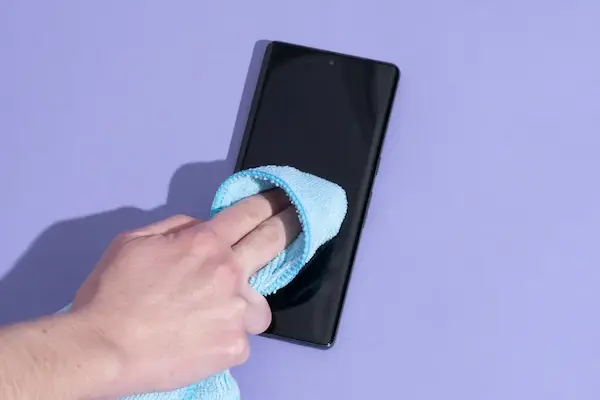
Microfiber cloth (soft, non-abrasive, lint-free)
-
Small spray bottle of distilled water
-
70% isopropyl alcohol (used sparingly if needed)
-
Pre-moistened electronic cleaning wipes (specifically for screens)
-
Soft brush for dust around speaker grills and edges
-
Dry cotton pads (for the back or sides, never soaked)
Optional but helpful items
-
Air blower bulb for dust removal
-
Screen-safe cleaning solution designed for electronics
-
Case cleaning cloth for the outer shell
Why microfiber cloths are essential
-
They trap dust rather than push it around.
-
They avoid scratching even delicate surfaces.
-
They work effectively without liquid.
-
They are washable and reusable.
Because microfiber cloths provide the safest and simplest cleaning experience, they remain the foundation of every recommended cleaning method.
3. Materials You Should Never Use on a Phone Screen
Using unsafe materials can remove protective coatings, scratch the glass, or push debris deeper into the phone’s edges, so memorizing the following list helps prevent expensive mistakes.
Avoid these materials
-
Paper towels
-
Tissues or napkins
-
Kitchen sponges
-
Abrasive cloths
-
Magic erasers
-
Vinegar
-
Bleach
-
Ammonia-based cleaners
-
Glass or window cleaner
-
Household antibacterial sprays
-
Excess water of any kind
Avoid these cleaning motions
-
Circular scrubbing with pressure
-
Rubbing aggressively at stubborn marks
-
Wiping when the screen is gritty (blow dust off first)
-
Spraying anything directly onto the device
Why avoiding these items matters
-
Paper towels and tissues contain wood fibers that scratch glass.
-
Household cleaners contain chemicals that dissolve coatings.
-
Excess moisture can enter speaker holes or the charging port.
-
Magic erasers act like ultra-fine sandpaper on coatings.
Understanding what not to use saves the screen from long-term wear.
4. Step-by-Step Guide: How to Clean the Phone Screen Safely
This section uses long, slow instructions so even a beginner feels confident.
Step 1: Turn Off the Device
Turning off the phone not only prevents accidental inputs but also makes smudges and streaks easier to see, allowing you to clean more effectively and safely.
Steps
-
Hold the power button.
-
Choose Power Off.
-
Remove the case if you plan to clean the entire device.
Step 2: Gently Remove Surface Dust
Removing dry dust before wiping prevents scratches that occur when grit drags across the glass.
How to remove dust safely
-
Use an air blower bulb with short, gentle puffs.
-
If you do not have a blower, lift dust lightly with a dry microfiber cloth.
-
Avoid rubbing at this stage; simply glide the cloth.
Why this matters
Dust contains hard particles that scratch glass when pushed.
Step 3: Wipe the Screen with a Dry Microfiber Cloth
A dry microfiber cloth often removes most fingerprints without liquid.
Method
-
Hold the phone firmly by the sides.
-
Use slow downward strokes, not circles.
-
Start at the top and move toward the bottom.
-
Do not press hard; let the cloth do the work.
Tips
-
Fold the cloth so a clean surface always touches the glass.
-
If streaks remain, progress to the next step.
Step 4: Use Lightly Damped Microfiber for Stubborn Smudges
A tiny amount of moisture loosens oils safely.
How to dampen cloth properly
-
Spray distilled water onto the cloth, not the phone.
-
Use only one or two light spritzes.
-
Ensure the cloth is barely damp, not wet.
Wiping technique
-
Make long, straight passes across the screen.
-
Focus on smudged areas gently.
-
Immediately dry the screen with the other side of the cloth.
Safety reminders
-
Do not let moisture pool near speaker holes.
-
Avoid wiping near edges with excessive pressure.
Step 5: For Deep Cleaning, Use Screen-Safe Alcohol
Using 70% isopropyl alcohol sparingly helps remove stubborn grime and disinfects the device without saturating the screen.
Method
-
Apply a small amount to a microfiber cloth.
-
Wipe gently with long strokes.
-
Immediately dry with a clean section of the cloth.
What this cleans effectively
-
Makeup smudges
-
Sticky residue
-
Greasy fingerprints
-
General bacteria buildup
Precautions
-
Never use alcohol above 70%.
-
Do not apply alcohol directly to the screen.
-
Use very small amounts to preserve the oleophobic coating.
Step 6: Clean the Sides and Back of the Phone
The back and frame collect dirt from hands, pockets, and surfaces.
Safe cleaning for sides and back
-
Use a slightly damp microfiber cloth.
-
Clean around buttons gently.
-
Use a soft brush near speaker grills and ports.
-
Dry thoroughly afterward.
Do not insert anything into ports
-
No cotton swabs
-
No metal tools
-
No pressurized air cans
This prevents internal damage.
Step 7: Clean the Case Before Reattaching It
A dirty case makes the phone feel dirty even after cleaning the screen.
How to clean different case materials
Silicone cases
-
Use warm water with mild soap.
-
Scrub with a soft cloth.
-
Dry completely before installing.
Plastic cases
-
Wipe with a damp microfiber cloth.
-
Remove stains with a tiny amount of 70% alcohol.
Leather cases
-
Use a dry cloth only.
-
Apply leather conditioner if necessary.
A clean case helps keep the phone cleaner longer.
5. How Often Should You Clean Your Phone Screen?
Cleaning frequency depends on habits, environment, and how frequently the device is handled.
Recommended routine
-
Light wipe: Daily or every two days
-
Deep clean: Once a week
-
Case cleaning: Every one to two weeks
-
Port dust check: Once a month
When to clean more often
-
After cooking
-
After gym sessions
-
When sick
-
During travel
-
After using the phone outdoors in dusty areas
Regular, gentle cleaning prevents grime buildup and keeps the device looking clearer.
6. Additional Tips for Safer, More Effective Cleaning
These extra suggestions help extend the life of the device and keep the cleaning process safer.
Tip 1: Use a Simple Background to Spot Smudges Easily
A darker solid wallpaper helps reveal fingerprints, making cleaning more effective.
Tip 2: Keep a Small Microfiber Cloth in Your Bag or Desk
Regular gentle wipes reduce the need for heavy cleaning sessions.
Tip 3: Avoid Eating While Using the Phone
Food oils transfer easily and attract more dust.
Tip 4: Clean the Phone After Removing Makeup
Makeup transfers quickly and often requires alcohol to remove.
Tip 5: Never Use Compressed Air Cans
Strong pressure can push moisture or particles into the device.
Tip 6: Replace Worn Cloths
Old microfiber cloths accumulate debris and become less safe.
Tip 7: Consider a Screen Protector for Additional Safety
A screen protector absorbs minor scratches and can be replaced easily and cheaply if damaged.
7. Troubleshooting: What to Do When Cleaning Fails
Sometimes smudges, scratches, or debris resist cleaning; in such cases, use these approaches.
If stubborn streaks remain
-
Switch to a fresh microfiber cloth.
-
Use a lightly dampened cloth instead of dry.
-
Apply a tiny amount of alcohol to dissolve oils.
If scratches appear
-
They are usually micro-scratches from abrasive cleaning.
-
Installing a screen protector hides most minor scratches.
-
Avoid using paper towels or rough cloths in the future.
If moisture enters the edges
-
Power off the device.
-
Dry with a cloth.
-
Let the phone air out for several hours.
-
Avoid charging until completely dry.
If lint collects near sensors
-
Use a soft brush instead of a cloth.
-
Brush gently downward to avoid pushing lint inward.
8. Quick One-Minute Daily Cleaning Routine
When you do not have much time, this short routine keeps the phone fresh.
Routine
-
Turn off the screen.
-
Blow off dust lightly.
-
Wipe with a dry microfiber cloth.
-
Clean sides quickly.
-
Check the back of the phone.
This routine prevents buildup and keeps cleaning simple.
9. Weekly Deep-Clean Checklist
To maintain long-term cleanliness, this detailed checklist helps.
Checklist
-
Remove case
-
Clean screen with dry cloth
-
Use damp cloth for deeper smudges
-
Use minimal alcohol for stubborn areas
-
Clean sides and back
-
Clean the case thoroughly
-
Let everything dry
-
Reassemble the phone
This keeps the device hygienic and pleasant to use.
Final Thoughts
Learning how to clean a phone screen safely becomes a valuable skill once you appreciate that your device interacts constantly with your hands, face, clothing, and surfaces throughout the day, which means smudges, oils, germs, and dust will naturally accumulate and require thoughtful removal; therefore, adopting a calm, careful cleaning routine with gentle materials, slow motions, and complete moisture control not only keeps the screen clear but also extends the longevity of its protective coating and overall appearance.
Following this complete guide ensures that you understand exactly how to clean your phone without causing damage, how often to repeat the process, which mistakes to avoid permanently, and how to maintain a hygienic device that feels pleasant to hold and satisfying to use every single day.