Social media has become a natural extension of daily life for millions of people, serving as a place to share moments, follow news, talk with friends, promote work, and stay connected, yet many active users have never taken the time to carefully review the privacy settings that control who can see, interact with, and collect information from their profiles.
For most people, accounts were created quickly, often years ago, with default settings that felt fine at the time, but platforms change, features evolve, and habits shift, which means that information once shared casually may now be visible to more people than originally intended.
This complete social media privacy settings guide was created to help you understand, in a friendly and non-alarmist way, how privacy works on social networks, which areas deserve attention, and how small adjustments can give you more control over your digital presence without forcing you to abandon the platforms you enjoy.
Throughout this article, you will find clear explanations, practical examples, numbered steps, and simple lists that show where to look, what to adjust, and why it matters, always with the idea that privacy is about choice and awareness, not fear or isolation.
The goal is to help you feel comfortable reviewing your settings, making informed decisions, and creating a routine that keeps your profiles aligned with your current life, values, and comfort level.
Why Social Media Privacy Deserves Regular Attention
Privacy on social media is not something that can be set once and forgotten, because platforms frequently introduce new features, change default behaviors, and encourage sharing in new ways, which can slowly expand who sees your content without you realizing it.
Users who never revisit settings may discover much later that posts, photos, or personal details are visible to a wider audience than expected.
Common Reasons Privacy Settings Get Outdated
- Accounts created many years ago.
- New features added automatically.
- Changes in personal or professional life.
- Shifts in how platforms suggest sharing.
Reviewing settings is a form of digital maintenance.
Understanding What Social Media Privacy Really Means
Social media privacy does not mean hiding completely or becoming invisible online, but rather choosing consciously who can see your posts, who can interact with you, and how much information about you is collected or displayed.
Privacy exists on a spectrum, and each person can find a balance that fits their comfort level.
Main Areas Controlled by Privacy Settings
- Who can see your posts.
- Who can contact or tag you.
- What personal information is visible.
- How location data is used.
Each area can usually be adjusted independently.
Why Default Settings Are Not Always Ideal
Default privacy settings are designed to work for the widest possible audience, which often means encouraging sharing and interaction, rather than maximum privacy.
While defaults are not necessarily unsafe, they may not match your current needs.
Examples of Default Setting Limitations
- Posts visible to a broad audience.
- Tags allowed without approval.
- Location sharing enabled.
Personal review is always better than assumptions.
Preparing for a Privacy Review Without Stress
Before opening settings menus, it helps to approach the process calmly, knowing that changes are reversible and that you can adjust things gradually.
You do not need to do everything at once.
Helpful Mindset for Privacy Reviews
- No need for perfection.
- Small changes already help.
- You stay in control.
Privacy reviews should feel empowering.
First Area to Review: Who Can See Your Posts
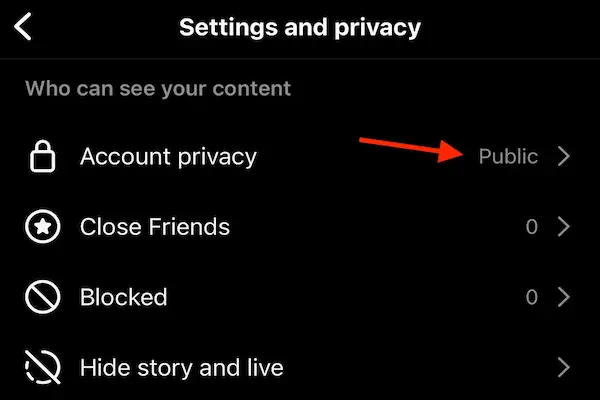
Post visibility is one of the most important and impactful privacy settings, because it defines the audience for your photos, thoughts, updates, and shared content.
Many users are surprised to discover how wide their audience actually is.
Common Post Visibility Options
- Public.
- Friends or connections.
- Custom groups.
Each option offers a different level of exposure.
When More Restricted Visibility Makes Sense
- Personal or family photos.
- Opinions meant for close circles.
- Daily life updates.
Not everything needs a public audience.
Reviewing Past Posts Visibility
Privacy reviews are not only about future posts, because older content may still be visible based on previous settings.
Why Reviewing Old Posts Matters
- Past posts reflect past contexts.
- Life circumstances change.
Old content deserves fresh perspective.
Second Area to Review: Profile Information Visibility
Social media profiles often contain personal details that may not need to be visible to everyone.
Common Profile Information Fields
- Birthdate.
- Workplace.
- Education.
- Contact information.
Each field usually has its own visibility setting.
Safer Profile Information Practices
- Hide full birthdate.
- Limit contact details visibility.
Less exposure reduces misuse risk.
Third Area to Review: Tagging and Mentions
Tagging allows others to connect your profile to photos, posts, or comments, which can be convenient but also create unwanted visibility.
Many users are tagged without noticing immediately.
Why Tag Review Is Important
- Tags appear on your profile.
- Tags extend audience reach.
Control over tags equals control over image.
Recommended Tag Settings for More Privacy
- Enable tag approval.
- Limit who can tag you.
Reviewing before appearing gives choice.
Fourth Area to Review: Who Can Contact You
Privacy is not only about what people see, but also about who can reach you through messages, comments, or friend requests.
Contact-Related Settings to Check
- Who can send messages.
- Who can comment on posts.
- Who can send friend requests.
Boundaries improve online comfort.
Managing Comments and Interactions Calmly
Interactions are part of social media, but not all interactions are welcome or healthy.
Options That Help Reduce Stress
- Filtering certain words.
- Limiting comments to friends.
Comfort matters as much as visibility.
Fifth Area to Review: Location Settings
Location sharing is often enabled automatically through apps or devices, sometimes without clear awareness.
Why Location Sharing Deserves Attention
- Reveals routines.
- Shows real-time presence.
Location data can be sensitive.
Safer Location Sharing Habits
- Disable precise location.
- Avoid real-time check-ins.
Sharing later is safer than sharing live.
Understanding Audience Differences Between Stories and Posts
Many platforms treat stories differently from regular posts, sometimes with different audiences.
Common Differences
- Stories expire faster.
- Stories may reach broader audiences.
Temporary does not always mean private.
Reviewing App Permissions Connected to Social Media
Social media accounts are often connected to external apps, games, or services.
Why App Connections Matter
- Apps may access profile data.
- Old apps may no longer be used.
Removing unused connections improves privacy.
Advertising Preferences and Personalization
Many platforms use activity to personalize ads.
What You Can Usually Control
- Ad topics.
- Use of activity data.
Less personalization means less tracking.
Balancing Privacy With Visibility for Different Goals
Some users want privacy for personal posts while keeping professional visibility.
Possible Balanced Approaches
- Use custom audiences.
- Separate personal and public content.
Privacy does not mean silence.
Why Reviewing Privacy Settings Is Not a One-Time Task
Just like updating apps, privacy reviews should happen periodically.
Good Moments to Review Settings
- Once or twice a year.
- After major platform updates.
- After life changes.
Regular reviews keep settings aligned.
Creating a Simple Privacy Review Routine
A routine makes the process easier and less overwhelming.
Suggested Routine Steps
- Review post visibility.
- Check profile information.
- Review tags and location.
Small sessions work well.
Talking With Family Members About Social Media Privacy
Privacy awareness can be shared within families.
How to Start the Conversation
- Share what you learned.
- Review settings together.
Learning together builds confidence.
Printable Checklist: Social Media Privacy Settings Guide
Profile Review
- Post visibility checked.
- Profile information limited.
Interaction Review
- Tag review enabled.
- Contact limits adjusted.
Location and Ads
- Location sharing reviewed.
- Ad preferences adjusted.
This checklist can be saved or printed.
Common Myths About Social Media Privacy
Myth: Privacy Settings Are Only for Experts
They are designed for everyday users.
Myth: Restrictive Settings Ruin Social Media
They often improve comfort.
Myth: Once Set, Privacy Is Done
Ongoing review is important.
Practice Exercise: One Profile Review Today
Exercise Steps
- Open your main social profile.
- Check post visibility.
- Adjust one setting.
One small action builds momentum.
Frequently Asked Questions About Social Media Privacy Settings
Will changing settings affect past posts?
Some settings apply retroactively.
Can I undo privacy changes?
Yes, most changes are reversible.
Is private always better?
Better means what feels right for you.
Final Thoughts and a Friendly Next Step
Following a social media privacy settings guide is not about distrusting platforms or withdrawing from online spaces, but about taking ownership of your digital presence and making sure it reflects your current comfort level and intentions.
When you review who sees your posts, manage tags and location sharing, limit unnecessary exposure, and revisit settings from time to time, social media becomes a more controlled and enjoyable experience.
Could you choose one social media account today and spend just ten minutes reviewing the most important privacy areas, knowing that even small adjustments can make a meaningful difference in how comfortable you feel online?