
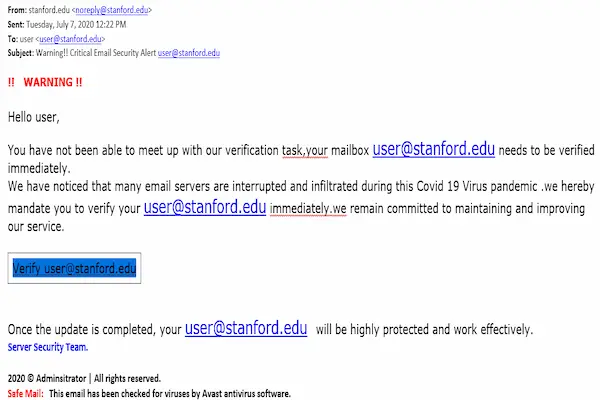
Email is still one of the most common ways people communicate, work, receive bills, recover passwords, confirm purchases, and stay informed, which unfortunately also makes it one of the favorite channels for scams and fake messages designed to trick users into acting quickly.
For many everyday users, opening the inbox can feel stressful, especially when there are dozens of unread messages mixed between real notifications, promotions, newsletters, and suspicious emails that look urgent, official, or even threatening.
This complete guide on how to recognize phishing emails was created to help you feel calmer and more confident when reading your messages, showing you how to spot warning signs, compare real emails with fake ones, understand common tricks used by scammers, and know exactly what to do when something feels wrong.
Throughout this article, you will see clear explanations, described examples, practical lists, and simple habits that anyone can apply, without technical language, without fear, and without the need for special tools.
The objective is to help you protect your information, your accounts, and your peace of mind, while continuing to use email normally and safely.
What Phishing Emails Really Are
Phishing emails are fake messages created to look legitimate, usually pretending to come from companies, services, banks, delivery services, or even people you know, with the goal of making you click a link, open an attachment, or share sensitive information.
Instead of attacking one person specifically, most phishing emails are sent in large quantities, hoping that at least some recipients will fall for the trick.
Common Goals of Phishing Emails
- Steal login credentials.
- Collect personal information.
- Trick users into downloading harmful files.
- Create panic or urgency to force quick action.
Understanding these goals makes it easier to spot suspicious behavior.
Why Phishing Emails Are So Common
Phishing works because it targets human behavior rather than technology, using emotions like fear, curiosity, urgency, or excitement to bypass rational thinking.
Even careful users can be caught off guard on a busy day.
Reasons Phishing Emails Are Effective
- They look professional.
- They imitate real services.
- They arrive unexpectedly.
Scammers rely on distraction and pressure.
Why Anyone Can Receive Phishing Emails
Receiving phishing emails does not mean you did something wrong, because email addresses are collected from many sources, including public websites, leaked databases, or random combinations.
Being targeted does not mean being vulnerable.
Common Sources of Your Email Address
- Online registrations.
- Public profiles.
- Data leaks from services.
Exposure is often out of your control.
The Most Common Types of Phishing Emails
Recognizing patterns helps you react faster.
Account Warning Emails
- Claim suspicious activity.
- Threaten account closure.
Urgency is the main weapon here.
Fake Delivery or Invoice Emails
- Mention packages you did not order.
- Include links to “track” items.
Curiosity drives clicks.
Prize or Reward Messages
- Claim you won something.
- Ask for details to receive it.
Unexpected rewards should raise suspicion.
Password Reset Messages
- Say someone tried to log in.
- Push you to reset immediately.
Pressure reduces careful reading.
First Warning Sign: Urgent or Threatening Language
Phishing emails often create a sense of urgency to stop you from thinking clearly.
Common Urgent Phrases
- “Act now or your account will be closed.”
- “Immediate action required.”
- “Your account has been compromised.”
Real companies rarely threaten instantly.
Second Warning Sign: Suspicious Sender Address
The sender name may look correct, but the actual email address often reveals problems.
What to Look For in the Sender
- Misspelled domains.
- Extra words or numbers.
- Generic email services.
Small details matter a lot.
Third Warning Sign: Generic Greetings
Many phishing emails avoid using your name.
Examples of Generic Greetings
- “Dear user.”
- “Dear customer.”
- “Hello account holder.”
Legitimate services often personalize messages.
Fourth Warning Sign: Poor Language or Formatting
While not always present, many phishing emails contain unusual grammar, spelling errors, or odd formatting.
Language Red Flags
- Awkward sentences.
- Strange capitalization.
- Unexpected symbols.
Professional messages are usually consistent.
Fifth Warning Sign: Suspicious Links
Links are one of the most dangerous elements in phishing emails.
How Suspicious Links Behave
- Text does not match destination.
- Strange or long addresses.
- Shortened links.
Links deserve careful attention.
Safe Way to Check Links Without Clicking
You can often see where a link goes by hovering over it with your mouse or pressing and holding on mobile devices.
What to Check When Hovering
- Does the address match the sender?
- Does it look familiar?
If unsure, do not click.
Sixth Warning Sign: Unexpected Attachments
Attachments can contain harmful files.
Attachment Red Flags
- Unexpected invoices.
- Files you did not request.
When in doubt, do not open.
Comparing a Legitimate Email and a Phishing Email
Seeing differences side by side helps train your eye.
Legitimate Email Characteristics
- Clear sender address.
- Personalized greeting.
- No pressure.
Phishing Email Characteristics
- Urgent tone.
- Generic greeting.
- Suspicious links.
Patterns repeat frequently.
Phishing Emails That Look Almost Perfect
Some phishing emails are very well written.
In these cases, behavior matters more than appearance.
Behavior-Based Red Flags
- Requests for passwords.
- Requests for codes.
Legitimate services do not ask this way.
What to Do When You Receive a Suspicious Email
Reacting correctly is more important than reacting fast.
Safe Steps to Follow
- Do not click links.
- Do not download attachments.
- Do not reply.
Stopping interaction prevents harm.
How to Verify a Message Safely
If a message claims to be from a service you use, verification should happen outside the email.
Safe Verification Methods
- Open the service manually.
- Check notifications inside the account.
Never use email links to verify.
What to Do If You Already Clicked a Link
Clicking once does not always mean damage.
Immediate Actions
- Close the page.
- Do not enter information.
- Change passwords if entered.
Quick response limits risk.
What to Do If You Entered Information
Taking action early helps.
Next Steps
- Change the affected password.
- Monitor the account.
Learning from mistakes builds resilience.
Phishing Emails on Mobile Devices
Phones make phishing more dangerous due to smaller screens.
Mobile-Specific Risks
- Harder to see addresses.
- Easier to tap links accidentally.
Extra care is needed on phones.
Habits That Reduce Phishing Risk
Daily Habits
- Read slowly.
- Question urgency.
Weekly Habits
- Review important accounts.
Habits protect better than tools alone.
Teaching Family Members to Recognize Phishing
Phishing affects families, not just individuals.
How to Explain Simply
- Use examples.
- Encourage asking questions.
Shared awareness increases safety.
Printable Checklist: How to Recognize Phishing Emails
Before Acting on an Email
- Is it urgent?
- Is the sender correct?
- Are there suspicious links?
If You Feel Unsure
- Stop.
- Do not click.
- Verify separately.
This checklist can be saved or printed.
Common Myths About Phishing Emails
Myth: Only Bad English Means Scam
Some phishing emails are very polished.
Myth: Spam Filters Catch Everything
Some scams still get through.
Myth: One Click Always Means Infection
Damage often requires further action.
Practice Exercise: Analyze One Email Today
Exercise Steps
- Open a suspicious email.
- Check sender and tone.
- Decide if it feels safe.
Practice builds confidence.
Frequently Asked Questions About How to Recognize Phishing Emails
Are phishing emails always obvious?
No, some are very convincing.
Should I reply to ask if it is real?
No, replying confirms your address.
Is deleting the email enough?
Yes, if no interaction occurred.
Final Thoughts and a Confident Next Step
Learning how to recognize phishing emails is not about becoming suspicious of every message, but about developing calm awareness, recognizing common patterns, and trusting yourself to pause before acting.
When you understand the signs of fake messages, verify information safely, and follow simple habits around links and attachments, email becomes far less stressful and much safer to use.
Could you make it a habit to pause for a few seconds before clicking any unexpected email today, using the signs you learned here as a quiet guide for safer online decisions?