
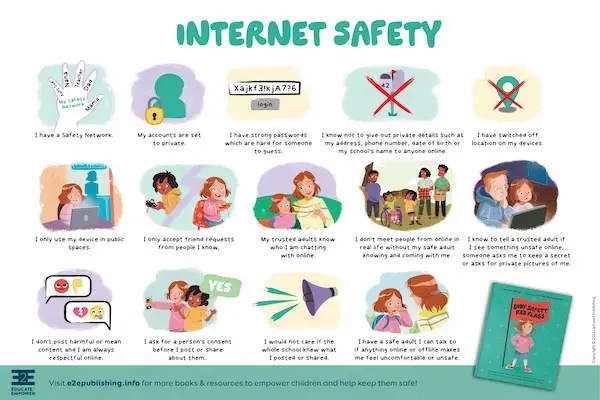
The internet is part of children’s lives much earlier than it was for previous generations, appearing in school activities, games, videos, conversations with friends, and even simple curiosity searches, which makes it natural for parents and caregivers to feel unsure about how to guide kids safely in this digital environment.
For many families, the challenge is not only protecting children from risks, but also finding the right balance between freedom and guidance, avoiding fear, punishment, or silence, while still creating clear rules that children can understand and follow.
This complete guide on internet safety tips for kids was created to support parents and caregivers who want to build simple rules, open conversations, and healthy habits around internet use, always with a caring, responsible, and sensitive approach that respects the child’s age and emotional development.
Throughout this article, you will find explanations written in clear language, examples of everyday situations, suggested family agreements, phrases that help start conversations with children, basic rules that kids can understand, and reminders about parental controls when they make sense, without turning technology into something scary or forbidden.
The main objective is to help families grow together in the digital world, using dialogue, trust, and presence as the main tools for online safety.
Why Talking About Internet Safety With Kids Is So Important
Children learn how to behave online in the same way they learn how to behave in the real world, which is by observing adults, asking questions, making mistakes, and receiving guidance that is repeated with patience and consistency.
When internet safety is not discussed at home, children may rely only on friends, videos, or trial and error, which can expose them to confusing or risky situations before they have the emotional tools to deal with them.
What Happens When There Is No Guidance
- Children may overshare personal information.
- Kids may click on unsafe content out of curiosity.
- Fear or shame can stop them from asking for help.
Open conversations reduce these risks significantly.
Understanding How Children Experience the Internet
For children, the internet does not feel abstract or dangerous, because screens often feel like extensions of play, learning, and social interaction, which is why adult assumptions about “common sense” do not always apply.
Kids usually do not separate online life from offline life clearly, especially at younger ages.
How Kids Commonly Use the Internet
- Watching videos and cartoons.
- Playing online or offline games.
- Doing school research.
- Talking with friends or classmates.
Understanding these uses helps guide rules better.
Internet Safety Is Not About Fear, It Is About Care
One of the most important ideas for parents to remember is that internet safety should never be based on fear, punishment, or constant suspicion, because those approaches often close communication instead of protecting the child.
Children who feel safe talking to adults are more likely to ask for help when something strange or uncomfortable happens online.
Healthy Safety Approach
- Curiosity instead of interrogation.
- Guidance instead of punishment.
- Presence instead of control only.
Trust grows when children feel heard.
Starting the Conversation About Internet Safety
Many parents delay conversations because they do not know how to start, but these talks do not need to be long, serious, or filled with technical details.
Simple and frequent conversations work better than one big talk.
Good Moments to Start Talking
- When a child gets their first device.
- After watching videos together.
- When school starts using online tools.
Daily moments are powerful opportunities.
Examples of Gentle Phrases to Talk With Children
Using simple and calm language helps children feel comfortable.
Phrases That Open Conversation
- “Can you show me what you like to watch online?”
- “What do you do if something online feels weird?”
- “If something bothers you on the screen, you can always tell me.”
These phrases invite sharing, not fear.
Basic Internet Safety Rules That Kids Can Understand
Rules should be clear, age appropriate, and explained calmly, so children understand not only what the rule is, but also why it exists.
Rule 1: Personal Information Stays Private
Children should understand that some information is private and should not be shared online.
Examples of Private Information
- Full name.
- Home address.
- School name.
- Passwords.
Explaining privacy in simple terms helps.
Rule 2: Ask an Adult Before Clicking Something New
Kids are naturally curious, so teaching them to pause before clicking helps create a habit of asking for help.
Situations Where Asking Is Important
- New games or apps.
- Pop-ups and ads.
- Links sent by unknown people.
Asking is a strength, not a weakness.
Rule 3: Screens Are Not for Everything and All the Time
Time limits are part of safety, not punishment.
Why Limits Matter
- Protect sleep and mood.
- Encourage other activities.
Balance supports healthy development.
Creating Family Agreements Instead of Strict Rules
Family agreements feel more respectful than rigid rules, because they involve conversation and shared responsibility.
What Is a Family Internet Agreement
- Clear expectations.
- Shared understanding.
- Room for adjustment.
Agreements grow with the child.
Examples of Simple Family Agreements
- Devices stay in common areas.
- No screens during meals.
- Internet stops at a set time.
Consistency matters more than perfection.
Talking About Online Strangers in a Calm Way
The idea of strangers online can be confusing for children, because friendly messages or game chats may not feel dangerous.
Instead of saying “never talk to anyone,” it helps to explain that not everyone online is who they say they are.
How to Explain Online Strangers
- “Some people online pretend to be kids.”
- “We only talk online with people we know in real life.”
Clear language builds understanding.
Helping Kids Recognize When Something Feels Wrong
Children may not always know how to describe uncomfortable feelings, so giving them simple words and permission to speak up is essential.
Signs a Child Might Feel Uncomfortable Online
- Sudden silence or withdrawal.
- Closing screens quickly.
- Changes in mood after using devices.
Observation complements conversation.
What to Tell Kids About Uncomfortable Situations
- “You will not be in trouble.”
- “I am here to help.”
Reassurance encourages honesty.
Online Games and Safety Basics for Kids
Games are a big part of children’s online experience and deserve special attention.
Common Risks in Online Games
- Chat with strangers.
- In-game purchases.
- Sharing personal details.
Awareness helps prevent problems.
Simple Game Safety Rules
- No chatting without permission.
- No buying without asking.
- No sharing personal info.
Repetition reinforces learning.
Social Media and Messaging Basics for Older Kids
As children grow, social platforms may become part of their social life, which requires updated conversations.
Important Topics to Discuss
- Kindness and respect.
- Permanent nature of posts.
- Privacy settings.
Digital actions have real effects.
Teaching Kids That Not Everything Online Is True
Children often believe what they see or hear online, especially when information comes from videos or friends.
How to Explain This Simply
- “Anyone can post online.”
- “Not everything is real or correct.”
Critical thinking grows gradually.
Using Parental Controls When They Make Sense
Parental controls can be helpful tools, especially for younger children, but they work best when combined with conversation and trust.
What Parental Controls Can Help With
- Limiting screen time.
- Blocking inappropriate content.
- Managing app downloads.
Tools support, not replace, parenting.
How to Talk About Parental Controls With Kids
- Explain they are for protection.
- Avoid secrecy.
Transparency builds cooperation.
]Being a Role Model for Healthy Internet Use
Children learn more from what adults do than from what adults say, especially regarding screens and technology.
Positive Examples to Show
- Putting phones away during family time.
- Talking calmly about online issues.
Modeling shapes behavior.
Encouraging Kids to Balance Online and Offline Life
Internet safety also includes helping children enjoy activities beyond screens.
Offline Activities That Support Balance
- Outdoor play.
- Reading.
- Creative hobbies.
Variety supports well-being.
What to Do If a Problem Happens Online
Even with good habits, issues may still happen, and preparation helps parents respond calmly.
Steps to Take
- Listen without blaming.
- Reassure the child.
- Pause online activity if needed.
Calm responses protect trust.
When to Seek Extra Help
Some situations may require additional support.
Examples
- Persistent fear or anxiety.
- Repeated exposure to harmful content.
Support is a sign of care.
Printable Family Checklist: Internet Safety Tips for Kids
Daily Reminders
- Talk about what you see online.
- Ask before clicking.
Weekly Habits
- Review apps and games.
- Check screen time balance.
Ongoing Values
- Kindness.
- Honesty.
- Trust.
This checklist can be adapted to each family.
Common Myths About Kids and Internet Safety
Myth: Blocking Everything Keeps Kids Safe
Conversation is just as important as restriction.
Myth: Kids Will Not Tell Adults About Problems
They often do when they feel safe.
Myth: Safety Talks Scare Children
Calm talks build confidence.
Practice Exercise: One Conversation This Week
Exercise Idea
- Choose a relaxed moment.
- Ask about favorite online activity.
- Listen more than you speak.
Small conversations create big impact.
Frequently Asked Questions About Internet Safety Tips for Kids
At what age should I start talking about internet safety?
As soon as children start using screens.
Should I check everything my child does online?
Guidance and trust should grow together.
Are parental controls enough?
They work best with open conversation.
Final Thoughts and a Caring Next Step
Teaching internet safety tips for kids is not about controlling every click or creating fear, but about building a safe space where children feel supported, informed, and confident to navigate the digital world with guidance from trusted adults.
When families create simple rules, talk openly, listen with empathy, and adjust expectations as children grow, internet safety becomes a shared journey rather than a constant struggle.
Could you choose one gentle conversation to have with your child this week about what they enjoy online, using curiosity and care as your guide, knowing that these small moments are the foundation of long-term digital safety?