
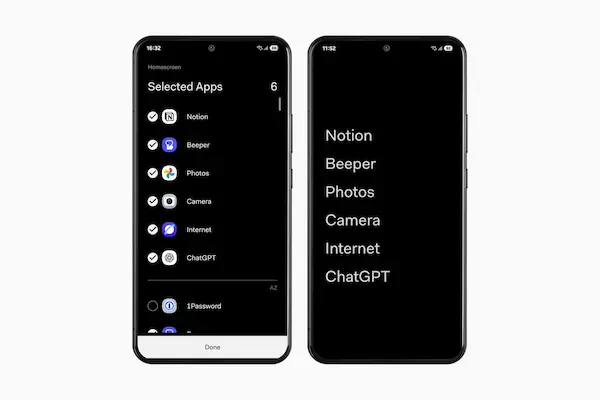
Using a smartphone every day can quietly become an overwhelming experience, not because of one single app or notification, but because the home screen itself often turns into a crowded space filled with colorful icons, badges, widgets, alerts, and visual noise that constantly compete for attention.
For many Android users, the phone stops feeling like a helpful tool and slowly starts acting like a source of distraction, breaking focus during work, study, rest, or even simple moments of silence.
This is where minimal distraction launcher apps Android enter the picture, offering a calmer and more intentional way to interact with the phone by reducing visual clutter, limiting unnecessary elements, and helping users focus on what truly matters.
This article was written with an inspiring, serene, and well-being focused tone, designed for people who want a cleaner phone, fewer distractions, and a more peaceful relationship with technology, without needing advanced technical knowledge.
Throughout this guide, you will discover what minimalist launcher apps are, how they work, which popular options are available on Android, what features they usually offer, examples of how a simplified home screen can look, and clear instructions on how to test a launcher safely and return to the original one if you ever change your mind.
What Is a Launcher and Why It Matters for Your Daily Experience
Before exploring minimal distraction launcher apps Android, it is important to understand what a launcher actually is, because many users use one every day without realizing it.
A launcher is the part of the Android system that controls your home screen, app drawer, icons, gestures, and overall navigation, acting as the visual and functional layer you interact with most.
Changing the launcher does not remove apps or data, but completely changes how the phone looks and feels.
Elements Controlled by a Launcher
- Home screen layout.
- App icons and names.
- Widgets and shortcuts.
- App drawer behavior.
- Gestures and navigation style.
This makes the launcher one of the most influential parts of the smartphone experience.
Why So Many People Seek Minimalist Launcher Apps
The interest in minimalist launcher apps has grown as more people reflect on their digital habits and notice how constant stimulation affects concentration, mood, and even sleep.
A crowded home screen invites frequent checking, endless scrolling, and impulsive app opening, often without a clear intention.
Minimalist launchers reduce these triggers by presenting fewer icons, simpler text-based lists, and neutral colors.
Common Reasons Users Choose Minimal Distraction Launchers
- Desire for better focus.
- Reducing screen time.
- Less visual stress.
- A calmer digital environment.
- More intentional phone use.
Digital well-being often starts with the home screen.
How Minimal Distraction Launcher Apps Android Work
Minimalist launcher apps focus on removing unnecessary visual elements and simplifying access to essential functions.
Instead of grids full of colorful icons, many of these launchers use text-based app lists, monochrome designs, or very limited icon sets.
The goal is not to restrict functionality, but to reduce temptation and visual overload.
Typical Characteristics of Minimalist Launchers
- Fewer icons on the home screen.
- Simple layout with neutral colors.
- Text based app access.
- Limited widgets.
- Optional app hiding.
Simplicity encourages conscious interaction.
Benefits of a Focus Home Screen
A focus home screen changes the way users relate to their phones, because it removes constant visual invitations to open apps without purpose.
When only essential tools are visible, users tend to open the phone with a clear intention and leave sooner.
Practical Benefits of a Minimal Home Screen
- Reduced impulsive app usage.
- Improved concentration.
- Cleaner visual experience.
- Faster access to important apps.
Small design changes can influence habits significantly.
Minimalist Launcher Apps Are Not About Restriction
One common misunderstanding is that minimalist launcher apps block apps or force strict rules, yet most of them focus on gentle guidance rather than control.
Users still have access to all installed apps, but the interface encourages mindful choices.
This makes minimalist launchers suitable even for people who do not want extreme digital detox solutions.
Overview of Popular Minimal Distraction Launcher Apps Android
In this minimal distraction launcher apps Android review, we will explore well known and safe launcher apps that focus on simplicity, clarity, and well-being.
Launchers Covered in This Guide
- :contentReference[oaicite:1]{index=1}
- :contentReference[oaicite:2]{index=2}
- :contentReference[oaicite:3]{index=3}
- :contentReference[oaicite:4]{index=4}
- :contentReference[oaicite:5]{index=5}
Each option will be described with its philosophy, main features, advantages, and limitations.
Niagara Launcher: One Handed and Minimal by Design
Niagara Launcher is known for its clean, single-column layout that prioritizes one-handed use and fast access without clutter.
Main Features of Niagara Launcher
- Vertical app list.
- Alphabet navigation.
- Minimal icons.
- Notification previews.
Why Users Choose Niagara
- Very clean design.
- Fast app access.
- Reduced visual noise.
Limitations to Consider
- Different from traditional layouts.
Best For
Users who want speed with simplicity.
Before Launcher: Calm Mornings and Evenings
Before Launcher focuses on reducing stimulation during key moments of the day, such as mornings and nights.
Main Features of Before Launcher
- Text based home screen.
- Minimal color usage.
- Optional notification filtering.
Why Users Like Before Launcher
- Very calming appearance.
- Encourages intentional phone use.
Limitations to Consider
- May feel too minimal for some.
Best For
Users seeking a serene digital environment.
Olauncher: Ultra Minimal and Open Source
Olauncher takes minimalism to an extreme by removing icons almost entirely.
Main Features of Olauncher
- Text only app names.
- No icons.
- Very simple layout.
Why Users Choose Olauncher
- Maximum reduction of distractions.
- Lightweight performance.
Limitations to Consider
- Not visually rich.
Best For
Users who want extreme simplicity.
Minimalist Phone: Guided Focus Experience
Minimalist Phone combines a simple launcher with focus-oriented features.
Main Features of Minimalist Phone
- Text based interface.
- Optional app timers.
- Clean layout.
Why Users Like It
- Gentle focus guidance.
- Easy to configure.
Limitations to Consider
- Some features are optional extras.
Best For
Users wanting minimalism with structure.
Smart Launcher: Minimal With Flexibility
Smart Launcher offers a balance between minimal design and customization.
Main Features of Smart Launcher
- Automatic app categories.
- Clean home screen.
- Custom icon support.
Why Users Choose Smart Launcher
- Less clutter.
- More control.
Limitations to Consider
- More options may distract some users.
Best For
Users wanting simplicity without losing customization.
Comparing Minimal Distraction Launcher Apps Android
Level of Minimalism
- Extreme: Olauncher.
- High: Before Launcher, Minimalist Phone.
- Moderate: Niagara Launcher, Smart Launcher.
Ease of Transition
- Very easy: Niagara Launcher.
- Easy: Smart Launcher.
- Moderate: Before Launcher.
Examples of a Simple Home Screen Setup
A minimal home screen usually includes only essential tools.
Common Apps Kept on a Minimal Home Screen
- Phone.
- Messages.
- Maps.
- Calendar.
- Camera.
Everything else remains accessible but not immediately visible.
How to Test a Minimalist Launcher Safely
Testing a launcher does not permanently change your phone.
Step by Step Testing Process
- Install the launcher.
- Set it as default.
- Use it for a few days.
- Observe your habits.
How to Return to the Original Launcher
Returning to the original launcher is simple.
Steps to Go Back
- Open phone settings.
- Go to default apps.
- Select home app.
- Choose the original launcher.
Tips for Adapting to a Minimal Launcher
- Give yourself time.
- Start with essentials.
- Avoid adding many widgets.
Common Mistakes When Using Minimalist Launchers
- Expecting instant productivity.
- Hiding essential apps.
- Changing settings too often.
Who Benefits Most From Minimal Distraction Launcher Apps Android
- People easily distracted.
- Students and remote workers.
- Users seeking digital calm.
Frequently Asked Questions About Minimalist Launchers
Do minimalist launchers block apps?
No, they reorganize access.
Will my phone become boring?
Many users find it peaceful.
Can I uninstall later?
Yes, at any time.
Creating a Healthier Relationship With Your Phone
Using minimal distraction launcher apps Android is not about rejecting technology, but about reshaping how it fits into daily life.
By choosing a simpler layout, reducing visual noise, and focusing on intentional use, many users discover that their phones become calmer tools rather than constant sources of interruption.
When the home screen supports focus instead of distraction, digital well-being becomes a natural part of everyday habits.